
Colophon docsHomepage and plans
Homepage and plans
The homepage builds itself from your posts and your tiers. You never edit it block by block.
How the homepage builds itself
From top to bottom. Empty blocks disappear.
- Hero: your Homepage heading, an optional Sub heading, a signup form (while Hero signup is on) and a preview of your latest post (unless Latest post is Hide). Under the form, Colophon shows a starting price when you have a paid tier.
- Featured: your three newest featured posts. Hidden when none is featured, or when Featured posts is Hide.
- Earlier issues: the numbered list, newest first, starting after the latest post. Newer, Older and page numbers sit below it. With Latest post on Hide the heading is Latest issues and the list starts with the newest post.
- Authors: a card for every author with a published post. Hidden on sites with one author, and when Show authors is off.
- Plans: your public paid tiers with prices. Hidden when you have none, when Stripe is not connected, or when Show plans is off.
- Join block: a last signup box. Visitors see a signup form, free members see an upgrade note when paid plans exist, and paid members see nothing.
The word "issue" in these labels comes from the Post name setting.
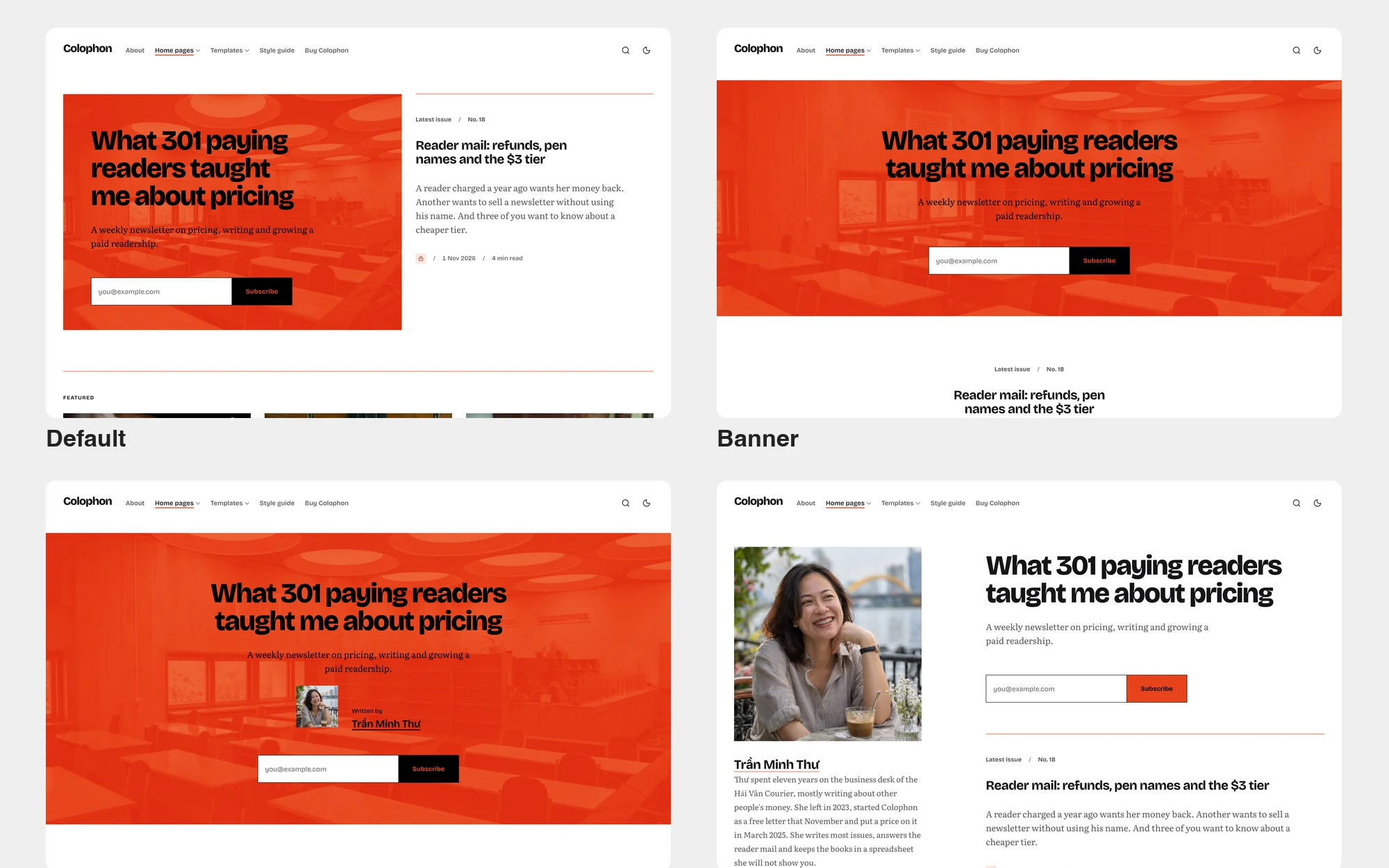
Hero styles
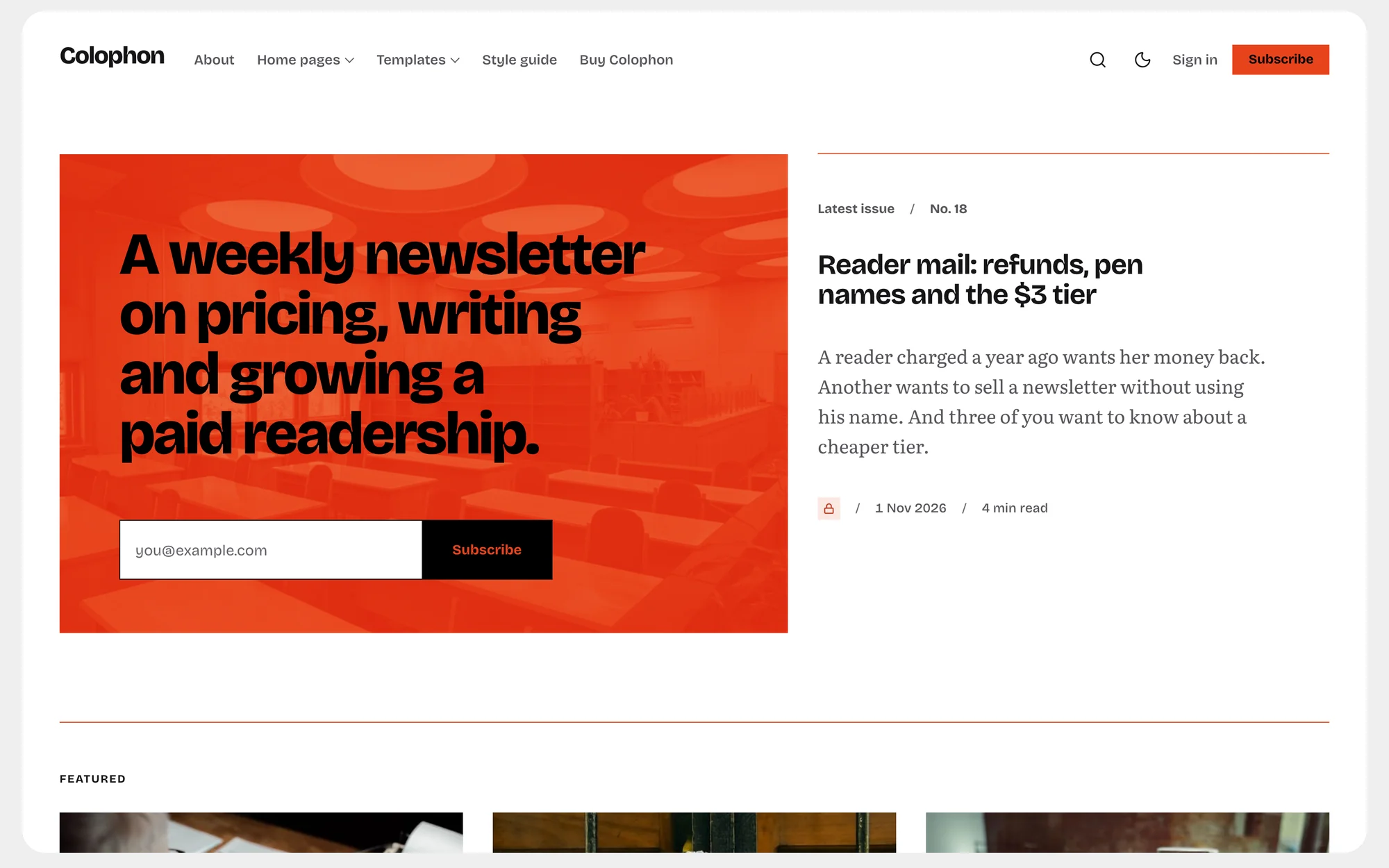
Choose one under Customize → Theme → Homepage → Hero style. All four use the same headline, sub heading, signup form and latest post. Only the layout changes.
- Default: the headline, sub heading and signup form sit in an accent-colour box, with the latest post beside it. Best for a newsletter that needs subscribers.
- Banner: a full-width accent band with the headline and signup centred in it. The latest post sits below the band.
- Banner with byline: the Banner, plus the author under the headline: a square photo, "Written by" and the name, linked to the author page. The author is the lead author of your newest post.
- Author: the author's portrait and bio lead, beside the headline. Best for a known solo writer. The author is the lead author of your newest post.
If your site has a cover image (Customize → Brand → Publication cover), Default and the banners blend it into the accent area behind the text. Without one, the area is plain accent.
On phones the headline and form always come first.
Hero signup and the latest post
Turn Hero signup off for a publication that leads with its writing. Visitors can still subscribe from the header button and the footer join band. In the Author style with Hero signup off, you get the author bio and the latest post, with no form.
Latest post works the same in every style: Image and text, Text only, or Hide.
Plans and prices
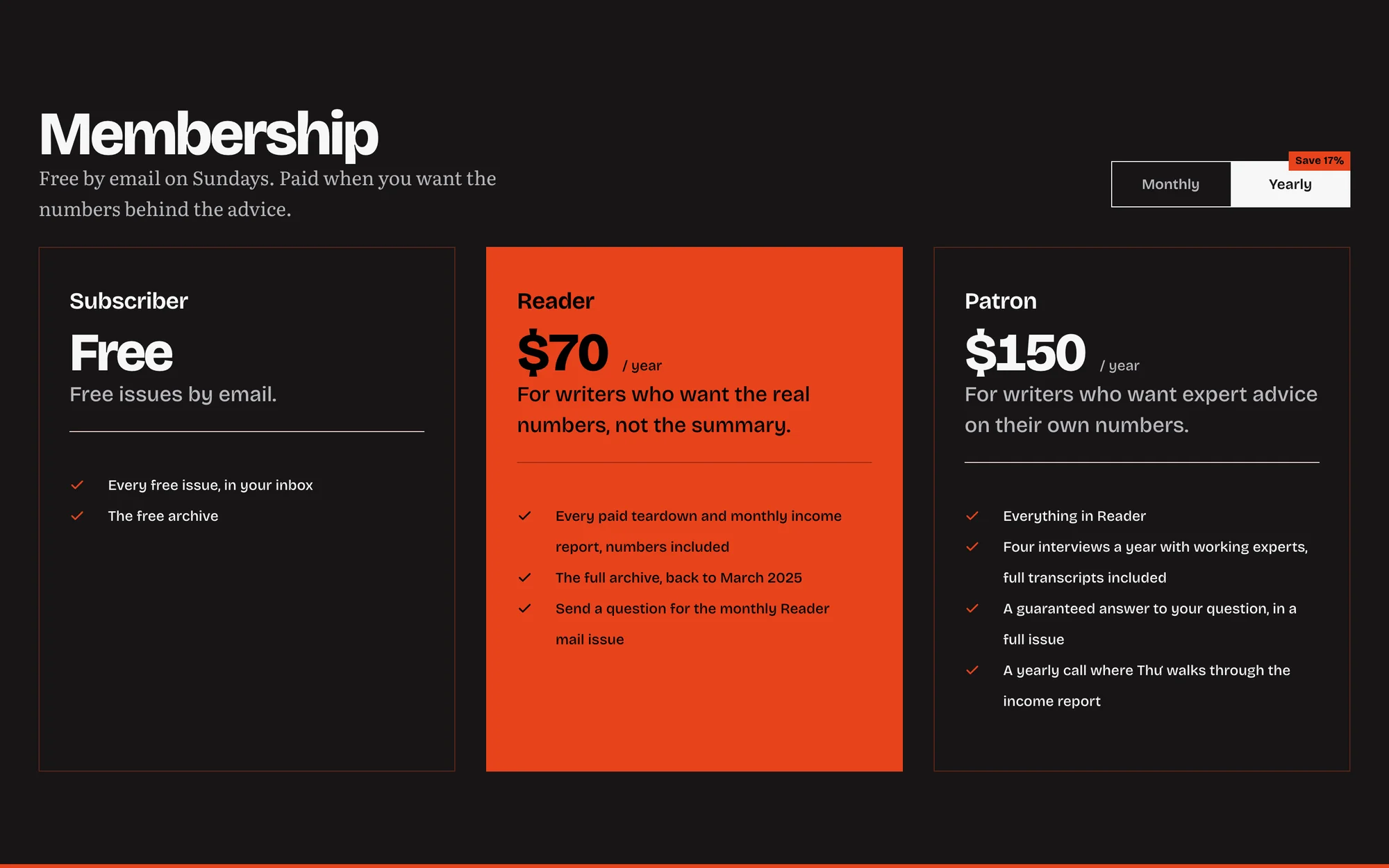
Connect Stripe in Settings → Membership. Then create tiers in Settings → Tiers, each with a monthly price, an optional yearly price, a description and benefits. Colophon reads them and shows them on the homepage, at the paywall and on the Membership page. Prices come from Ghost. There is nothing to type into the theme.
- A free Subscriber card comes first, for visitors who are not signed in. It shows only when at least one post is public or members-only.
- The benefits you write in Ghost become the list on each card.
- When plans have both a monthly and a yearly price, a Monthly / Yearly switch sits above the cards. Yearly is chosen first, with the saving worked out from your prices. The switch works with the keyboard and without JavaScript. It is hidden when no plan has both prices.
- The buttons open Ghost's own signup, so checkout runs through Stripe as usual.
You need at least one public paid tier for plans to show. If every post is for paying subscribers, the plans intro says so.
Heading of the plans band
The plans band is headed "Membership" by default. To change the heading and the line under it, create a page, give it the internal tag #membership, and write the heading as the page title and the line as the page excerpt. An internal tag starts with # and visitors never see it. This page also has a public address, so leave it out of your menus if you do not want it listed.
Free, members and paid posts
Set each post's access in the editor under Post settings → Post access. On sites with a public paid tier, Colophon labels posts so readers know before they click:
- Free: anyone can read it.
- Members: a free signup is needed.
- Paid: a paid plan is needed.
Labels, plans and the Archive filters are hidden on sites with no public paid tier.
The paywall
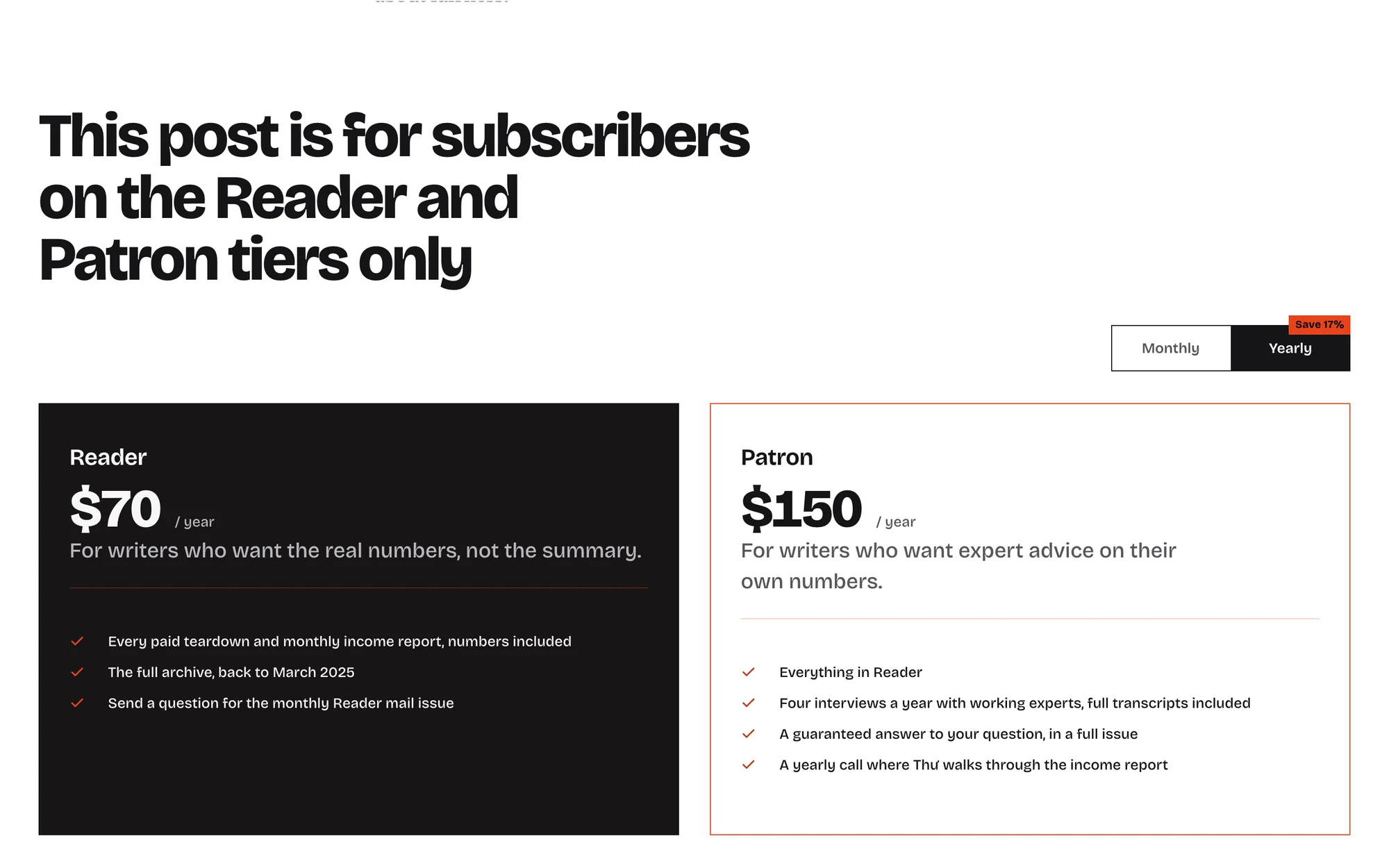
A reader without access sees the start of the post. Then comes a heading that says who the post is for, the plans that fit, and a "Sign in" link for people who already have an account.
- Paid post: paid plans only.
- Members-only post: the free signup and the paid plans.
- Post for chosen tiers: the heading names the tiers, and only those plans show.
- Signed-in free member: an upgrade link, and no sign-in prompt.
To choose where the preview ends, add a Public preview card in the editor. If you have no public paid tier, a members-only post offers free signup instead.
Issue numbers
With Issue numbers on, posts are numbered by publish date. Your oldest post is No. 1 and the newest has the highest number. Numbers show on each post, on the latest-post card and in lists. If you delete or unpublish a post, the numbers after it go down by one. Changing a publish date changes the numbers too.
Join box text
The wide signup boxes are the footer band and the signup box on the Membership page. To set their heading and text, create and publish a page with the internal tag #join. Its title becomes the heading and its body becomes the text. Lists, bold text and links work. Use one page only, and leave it out of your menus.
Without a #join page, the heading is "Join" and your site title, and the text is your site description. The footer join band shows to visitors on every page. It is hidden when memberships are off, and for paid members.
Featured posts
Open a post and switch on Feature this post. The three newest featured posts show under Featured on the homepage. Featured posts also get a small outlined Featured marker in lists and cards. Featured cards show only the picture, title and excerpt.
A site without paid plans
With memberships on and no public paid tier, visitors can still join free from the hero, the join boxes, and the footer. Plans, price notes, access labels and Archive filters disappear by themselves. With memberships off, all signup forms, sign-in links and plans disappear, and the Membership template shows the page's own content. Setting memberships off does not change access on posts you already restricted: set them to Public in the editor.